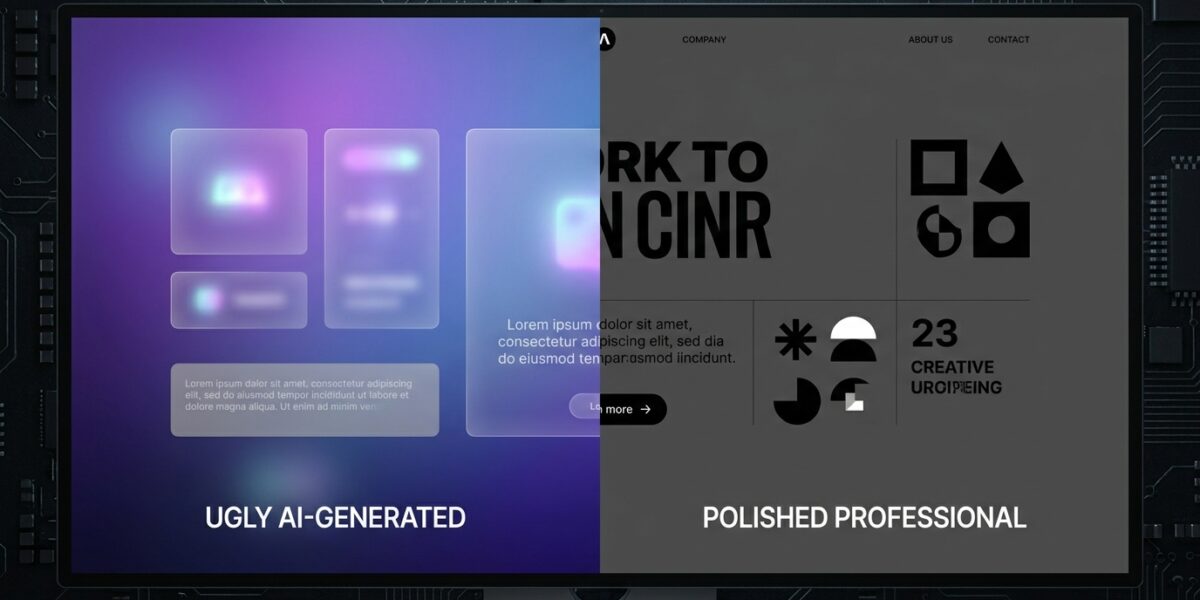
If you have used Claude Code, Cursor, or any AI coding tool to build a landing page in the last year, you know the look. Purple gradients bleeding into every section. Cards floating with that same soft shadow. Bounce easing on every animation. Dark mode with electric blue accents that feels like a 2019 crypto startup.
That is AI slop. And it is costing you conversions.
I have built dozens of landing pages with AI agents over the last 18 months. The pattern is clear: without guardrails, AI defaults to the visual language of whatever it saw most often in its training data. That means Dribbble circa 2022, SaaS landing pages with identical hero sections, and enough purple to make Prince blush.
This is not just an aesthetic problem. It is a business problem. When your website looks like everyone else’s, you do not stand out. When your animations are distracting instead of purposeful, you lose trust. When your color choices prioritize trendiness over readability, you lose customers.
Why AI Slop Kills Conversion Rates
AI slop is not just ugly — it is ineffective. Here is what happens when you let an AI agent design without constraints:
1. Visual fatigue. Your prospects have seen the purple-gradient-card-stack design fifty times this month. They scroll past without registering that your product is different.
2. Animation overload. AI loves motion. Every element bounces, fades, or slides in. But research from the Nielsen Norman Group shows that excessive animation reduces task completion rates by up to 25% because it distracts from the actual content.
3. Accessibility failures. Those low-contrast purple-on-dark text combinations? They fail WCAG guidelines. You are excluding colorblind users, older users, and anyone looking at your site in bright sunlight.
4. Brand erosion. If every page your AI builds looks like a template, you have no brand. You are interchangeable with any competitor who also used Claude Code without a style guide.
The good news: you can fix this. Over the last month, I have tested every tool designed to give AI agents better design taste. These are the eleven that actually work.
1. Impeccable.style — The AI Slop Detector
Impeccable is the most direct solution to AI slop. It is a design language and CLI tool that specifically detects the visual patterns that make AI-generated websites look alike.
The tool identifies 24 specific anti-patterns: purple gradients, excessive border radius, centered hero sections without substance, dark glows, overuse of glassmorphism, and more. It scans your codebase and flags these patterns with specific recommendations for alternatives.
What makes Impeccable powerful is that it does not just say “do not do this” — it gives you replacement patterns. Instead of a purple gradient, try a subtle texture. Instead of bouncing animations, use purposeful micro-interactions. Instead of card stacks, use editorial layouts with meaningful hierarchy.
Installation is simple:
npx impeccable detect src/
I run this on every AI-generated codebase before shipping. It catches the lazy defaults that slip through.
Resource: impeccable.style | GitHub
2. Taste-Skill — Give Your AI Good Taste
Taste-skill is a Claude Code skill that injects opinionated design rules directly into your AI agent. Instead of letting Claude guess what looks good, you give it a structured taste profile.
The skill works by defining visual parameters: color variance tolerances, motion intensity limits, spacing rhythm, typographic hierarchy rules. You tune these to match your brand, and Claude respects them.
The key insight here is that AI agents do not have taste — they have averages. Taste-skill replaces the average with your specific preferences. If you want generous whitespace and understated motion, you set that once and Claude applies it everywhere.
I use this for client work where consistency matters. One taste profile per brand, enforced across every component the AI generates.
Resource: tasteskill.dev | GitHub
3. UI UX Pro Max Skill — 55,000 Stars of Design Intelligence
This is the most popular design skill for AI coding agents. With over 55,000 GitHub stars, UI UX Pro Max provides searchable databases of UI patterns, color palettes, font pairings, and layout structures.
The skill works across Claude Code, Cursor, and Windsurf. You describe what you need — “a pricing page with three tiers and a highlighted recommended plan” — and it gives you specific component structures, color codes, and spacing values that follow established design principles.
What separates this from just asking an AI to “make a nice pricing page” is the curation. These patterns come from audited, high-converting designs. You are not getting the AI’s guess at what works. You are getting patterns proven in production.
Installation:
npx uipro init --ai claude
Resource: GitHub: ui-ux-pro-max-skill
4. Awesome-Design-MD — Teach AI What Good Design Looks Like
This is the most important tool on this list. Awesome-design-md is a collection of DESIGN.md files from 59 popular websites — Vercel, Stripe, Apple, Notion, Linear, Figma, and more.
A DESIGN.md is a plain text file that describes a company’s visual system. Colors, typography, spacing, component rules, interaction patterns. When you drop a DESIGN.md into your project root, Claude Code reads it and uses it as a style guide for everything it builds.
The power here is that you are not fighting the AI’s defaults. You are replacing them with documented, consistent rules. If you want to build a site that feels like Linear, you use Linear’s DESIGN.md. If you want to build a site that feels like your brand, you create your own DESIGN.md once and Claude applies it everywhere.
I wrote about this pattern in my Claude Code reference guide. It is the single best way to eliminate AI slop.
Resource: GitHub: awesome-design-md
5. Google Stitch — Generate UI from Text Prompts
Stitch is Google’s AI-native design tool. You describe what you want — “a settings page with a sidebar navigation and a form for profile information” — and it generates the full UI in multiple variants.
The output is clean, production-ready code. Stitch understands layout hierarchy, form patterns, and accessibility requirements. It is particularly good at generating initial page structures that you can then refine with Claude Code.
I use Stitch as a starting point for complex pages. Instead of describing every element to Claude, I generate the structure in Stitch, export the code, and have Claude wire up the functionality.
Resource: stitch.withgoogle.com
6. 21st.dev — The React Component Registry for AI
21st.dev is the largest React component registry built specifically for AI applications. Used by 1.4 million developers, it provides pre-built components that you can drop into Claude Code projects.
The components are designed for the AI era — modular, well-documented, and easy to customize. Instead of having Claude generate a complex component from scratch (which often leads to slop), you pull a battle-tested component from 21st.dev and modify it.
This reduces the surface area where AI slop can creep in. The heavy lifting is done by human-designed components. Your AI focuses on integration and customization.
Resource: 21st.dev
7. Playwright MCP — Test Your Frontend in Real Browsers
Playwright MCP is a Model Context Protocol server that lets Claude Code control actual browsers. This is critical for testing frontend designs.
Here is the workflow: Claude generates your landing page, then opens it in a real browser, takes screenshots, and checks for issues. Are the colors rendering correctly? Is the layout breaking on mobile? Are interactive elements working?
This catches the visual regressions that static code analysis misses. An AI might generate code that looks correct in the editor but fails in an actual browser. Playwright MCP closes that gap.
Installation:
claude mcp add playwright -- npx -y @playwright/mcp
Resource: playwright.dev
8. Canva MCP — Design Assets from Your Terminal
Canva’s official MCP server lets you create designs using Canva’s AI, autofill templates, and export as PDFs or images — all from Claude Code.
This is useful for marketing assets that need to match your web design. You build the landing page in Claude, then generate the corresponding social graphics, email headers, and ad creatives in Canva using the same color palette and typography.
The key advantage is consistency. Instead of designing your website and marketing materials separately (and ending up with mismatched colors), you use Canva MCP to pull the same design tokens into every asset.
Resource: Canva MCP Documentation
9. WebGPU + Three.js Skill — 3D Without the Slop
Three.js is powerful, but AI-generated three.js code tends toward the flashy — spinning cubes, excessive particle effects, and visual noise that distracts from your message.
The WebGPU Three.js skill for Claude Code helps you build 3D web experiences with better defaults. It uses TSL (Three.js Shading Language) for cleaner, more performant graphics code.
Use this when you actually need 3D — product configurators, data visualizations, immersive experiences. Do not use it for hero sections that would work better as a simple image. The skill helps you make that judgment call.
Resource: GitHub: webgpu-claude-skill
10. Google Fonts Skills — Typography Intelligence
Typography is where AI slop is most obvious. The default pairing is always Inter for body and some variation of Playfair Display or DM Serif for headings. It is safe, it is boring, and it screams AI-generated.
Google Fonts skills for Claude Code give your AI agent better typographic judgment. You can specify personality traits — “technical but approachable,” “luxury without pretension” — and get font pairings that match.
Good typography elevates everything else. A simple layout with excellent typography looks premium. A complex layout with bad typography looks cheap. These skills help you get it right.
11. Claude Skill-Maker — Create Brand Guidelines Your AI Learns From
This is the meta-tool. Skill-maker lets you create custom Claude skills — including brand guidelines that your AI references on every project.
Here is how I use it: I define my brand once. Colors, fonts, spacing scales, voice and tone rules, component patterns. I package this as a skill. Then, on every new project, I install that skill and Claude knows my brand standards immediately.
This eliminates the setup friction where you have to remind the AI of your preferences every session. The brand guidelines are encoded, not conversational.
If you are recreating landing pages regularly, this is your highest-leverage tool. One afternoon of setup saves you from repeating the same style conversations forever.
The Resource Table
| Tool | What It Does | Resource |
|---|---|---|
| Impeccable.style | Detects 24 AI slop patterns in your frontend code | impeccable.style |
| Taste-Skill | Injects opinionated design rules into Claude Code | GitHub |
| UI UX Pro Max | 55k+ stars, searchable UI patterns, palettes, fonts | GitHub |
| Awesome-Design-MD | 59 DESIGN.md files from Vercel, Stripe, Apple, etc. | GitHub |
| Google Stitch | AI-native UI generation from text prompts | stitch.withgoogle.com |
| 21st.dev | Largest React component registry for AI (1.4M devs) | 21st.dev |
| Playwright MCP | Browser automation for testing frontend designs in Claude | playwright.dev |
| Canva MCP | Create designs and export assets from terminal | Canva MCP |
| WebGPU + Three.js | 3D web experiences without flashy defaults | GitHub |
| Google Fonts Skills | Typography intelligence for AI coding agents | Claude MCP Marketplace |
| Claude Skill-Maker | Create brand guidelines your AI learns from | Built into Claude Code |
Frequently Asked Questions
What is AI slop in frontend design?
AI slop is the visual homogeneity that comes from AI coding tools defaulting to the most common patterns in their training data. Purple gradients, bounce easing, card-heavy layouts, and dark mode with electric accents are the most common examples. It happens when AI agents design without explicit style constraints.
How does AI slop affect conversion rates?
AI slop reduces conversions through visual fatigue, animation overload that distracts from content, accessibility failures that exclude users, and brand erosion that makes you interchangeable with competitors. Generic design signals generic value.
What is a DESIGN.md file?
A DESIGN.md is a plain text document that defines your visual system — colors, typography, spacing, components, and interaction patterns. Claude Code reads this file and uses it as a style guide, ensuring consistent output that matches your brand instead of defaulting to generic patterns. I use files from awesome-design-md as starting points.
Which frontend design tool should I start with?
Start with awesome-design-md and a DESIGN.md file that matches your brand aesthetic. This single change eliminates 80% of AI slop. Add Impeccable.style to catch the remaining anti-patterns, and Taste-Skill to tune Claude’s design defaults for future projects.
How do I test if my AI-generated frontend has slop?
Run Impeccable.style against your codebase with npx impeccable detect src/. It will flag specific anti-patterns with line numbers. Then use Playwright MCP to take screenshots in real browsers and verify the visual output matches your intent.
Can I use these tools with Cursor and Windsurf, or just Claude Code?
Most tools work across AI coding agents. UI UX Pro Max explicitly supports Claude Code, Cursor, and Windsurf. Awesome-design-md files work anywhere you can reference a style guide. Taste-skill is Claude-specific. Playwright MCP works with any MCP-compatible agent.
Want me to audit your landing page for AI slop? Get in touch — I do design reviews that focus on conversion, not just aesthetics.